
Based on a client investigation carried out 1 September 2026: raw server-log analysis, IP geolocation of visitor traffic, and inspection of the page’s embed source. Client details anonymised; the finding generalises to any embedded form.
Picture a fairly ordinary campaign. You’re running an event, so you build a registration form, embed it on your website, and put a few thousand dollars of Meta spend behind it. Registrations start coming in.
Then you look properly, and a lot of them aren’t real. Nonsense names. Disposable email addresses. Twenty sign-ups inside the same minute at three in the morning.
So you send it to whoever looks after your website — and the answer comes back that there’s nothing they can do about it.
That answer sounds like a brush-off. It usually isn’t. We’ve seen this exact situation on a client site recently, and the reason nobody could block it from our end is worth understanding before it happens to you.
Their website was well protected. Cloudflare in front of it, actively managed, the security you’d want on anything public-facing. None of it mattered, because the form wasn’t really on their website. It only looked like it was.
Embedded is not the same as hosted
If you’ve ever built a form in Microsoft Forms, Google Forms, Typeform, SurveyMonkey or Jotform and pasted the embed code onto your site, here’s what actually happens when someone visits that page.
Their browser loads your page from your website. Then it makes a second, separate request directly to Microsoft, or Google, or Typeform, and loads the form from there into a window on your page. To a visitor it looks like one page. Technically it’s two things stacked on top of each other.
Which means when a bot submits that form, the submission goes to Microsoft. It never touches your website at all.
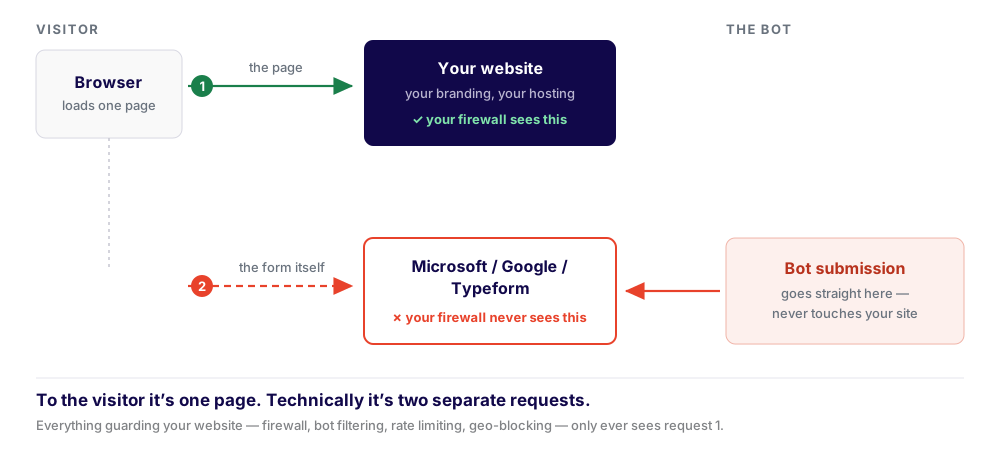
The submission in step 2 travels from the visitor straight to Microsoft. Your website isn’t in the path, so nothing guarding your website can act on it.
So every protective measure sitting in front of your site — the firewall, the bot filtering, the rate limiting, the ability to block a region or an IP — is looking at a road the traffic isn’t driving on.
We tested this on the client site. Pulling the raw server access logs and geolocating every visitor IP, the real people were all there — arriving from the ads, on local consumer internet connections, exactly as the campaign intended. The only overseas traffic in the logs was ordinary infrastructure: uptime monitoring, search crawlers, and Facebook fetching link previews. The fraudulent submissions weren’t in the logs at all. Not disguised, not buried — absent. They were never there to be logged.
You can’t block what never arrives.
Why ads make this worse
Bots find public forms on their own eventually. Ads speed it up considerably.
A campaign takes a URL that nobody knew about and puts it in front of a very large number of people, very quickly. Scrapers pick up ad destinations. Links get shared, forwarded and crawled. A form that would have stayed quietly unnoticed for months is suddenly a known, public, machine-readable endpoint.
That’s not an argument against running ads. It’s an argument for spending two minutes on the form before you spend money pointing traffic at it.
The part that matters when something goes wrong
Here’s the uncomfortable bit, and the reason this is worth understanding before you need to.
When a form is embedded from a third-party platform, it sits outside the reach of whoever looks after your website. That isn’t a limitation of your web team, your host or your agency — it’s a boundary. We can’t see those submissions, can’t filter them, can’t rate-limit them, can’t check the logs, can’t block a source. There’s no access to grant that would change it. The submissions genuinely aren’t ours to look at.
So when the fraudulent responses start arriving and you send it to your web people, the honest answer is: this one’s yours. Not because anyone’s passing the buck, but because the only controls that exist are inside the form tool’s own settings, and those belong to whoever owns that account.
That’s a perfectly reasonable trade to make. Embedded form tools are genuinely good — they’re fast, they’re free or cheap, they handle response collection and export, and for plenty of jobs they’re the right answer. But the trade is real and it’s worth making deliberately: you gain a tool that takes two minutes to set up, and you give up the ability for anyone else to help you defend it.
The time to know that is before the campaign, not during it.
The check to run before your next campaign
Five minutes, before the ads go live.
1. Find out where your form actually lives
Right-click directly on the form. If the menu includes an option mentioning a frame — “This Frame”, “Reload Frame”, “View Frame Source” — the form is embedded from somewhere else. If you get your browser’s ordinary menu with no mention of frames, it’s genuinely part of your site.
Second check if you want certainty: right-click → View Page Source, then search for iframe. If you find one pointing at a domain that isn’t yours — forms.cloud.microsoft (Microsoft’s newer address, so search for microsoft rather than office.com), docs.google.com, typeform.com and so on — that’s your form, and it’s not yours to defend. This one question determines everything else on this list.
2. Turn on the spam protection in the form tool itself
This is the big one, and it’s almost always switched off by default. Microsoft Forms has a reCAPTCHA setting buried in its options menu that is off unless you turn it on — … → Settings → “Require reCAPTCHA verification”.
The other major form tools have their own equivalents — response limits, verification steps, duplicate detection — under settings most people never open. Whichever tool you use, go and look, and assume it’s off until you’ve seen otherwise.
On the client site above, this single checkbox was the fix — thirty seconds, no developer required.
3. Add one written question
A single short free-text field — “in a sentence, what prompted you to take part?” — is remarkably effective. Automated submissions leave it blank or fill it with something generic and repetitive. It won’t stop bots on its own, but it makes the junk obvious when you go to analyse the results.
4. Break the form across multiple pages
Most form tools have a one-question-per-page option. Multi-step forms with progress state are meaningfully harder to script than a single flat page. Costs you nothing.
5. Decide whether it needs to be public at all
If your survey is for members, staff or a known group, requiring a sign-in ends the problem outright. If it genuinely needs to be open to the public, it doesn’t — but it’s worth asking rather than defaulting.
If it’s already happened
You can usually rescue the data. Export your responses to a spreadsheet and look at completion time — most form tools record it. Anything finished in a handful of seconds deserves a second look, as do clusters of submissions landing within moments of each other and written answers that repeat the same phrasing. Sort on those three signals and the real responses generally separate out fairly quickly. Better than starting the research over.
Where to draw the line
A rough rule: the more a form matters, the more it’s worth having on your own site.
For a quick internal poll or a low-stakes signup, an embedded form is completely fine. Use the tool, get on with your day. But if you’re putting real budget behind driving traffic to it, or the responses are going to inform a decision that matters, then the calculation shifts — because that’s exactly the situation where you want someone able to actually intervene when it goes sideways.
A form on your own site sits behind your site’s protection. It can be filtered, rate-limited and monitored, the submissions land somewhere you control, and when something goes wrong there’s an actual person who can go and look. That’s more work than pasting in an embed code. Sometimes it’s obviously worth it and sometimes it obviously isn’t. The mistake is not choosing at all.
Nobody in this story did anything unusual. It’s a normal tool, used in a normal way, on a well-protected website, with a reasonable assumption that the protection extended to the form. That assumption is easy to make and almost never questioned — right up until the moment it matters, which is the moment you find out that nobody on your side of the fence can do anything about it.
Not sure whether your forms sit on your site or someone else’s? That’s a quick thing to check, and a much better conversation to have before a campaign than during one. Happy to take a look.

Written by